PGdebt 9 trigger figures updates

NB. This page only applies to PGdebt 9 users.
PGdebt 8 has different triggers which are years out of date and will not be updated again by Money Advice Trust.
Click here for more info for PG8 users
PGdebt 7 and earlier do not use the trigger figures at all.

How does the trigger update work with PG9 ?
Most users need do nothing at all, this page is for information only
The Money Advice Trust has updates their trigger figures from time to time. PGdebt has been designed with updates like this in mind and the program will download the new figures when they are available and store them on your PC. On the due date the existing figures will be replaced by the new ones and will be used for all new cases from that date onwards. The older figures cannot be used again for new cases, though they will remain in place in existing cases which have already been set up using them. These older cases can easily be updated to the latest figures, but this must be done on an individual basis...see below.

CFS numbering system
Originally the CFS versions were numbers sequentially 3, 4, 5 etc.
But in 2010 this was changed to using the year the figures were introduced, 2010 was the first.
In 2011, MAT introduced the possibility of more than one change per year and this was not compatible with PGdebt.
So, from 2011 onwards PGdebt will show the CFS version as a 6 figure number. 4 figures for the year and 2 for the month of introduction.
So at the time of writing the latest figures are version 201104. Which means figures introduced in April 2011.

NB. The explanations and pictures below show the Ver 2010 to Ver 201104 changes but it will be just the same for later changes

How will I know the new triggers have been downloaded ?
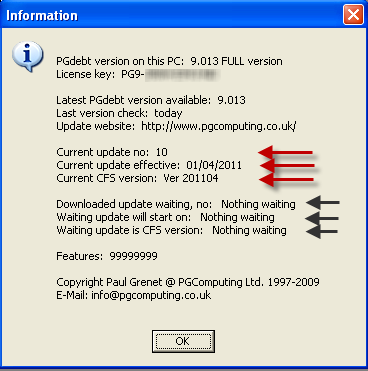
For more information you can also click the 'About' menu item on the top menu
NB.    It's past the due date and the triggers have not been downloaded ?
How do I update an existing client to the latest figures ?
My version of PGdebt 9 does not use the Internet, what should I do ?
I still use PGdebt 8, how can I get the new triggers ?


How will I know the new triggers have been downloaded ?
PG9 tells you what the current triggers are in a box at the foot of the client data window.

Before the update, Ver 2010 triggers in use but the new triggers are downloaded and ready to start in 2 days


Ver 201104 triggers downloaded and in use for all new cases

For more information you can also click the 'About' menu item on the top menu

'About' menu shows Ver 2010 update is now in use and the 201104 update is downloaded and waiting
This is before the start date for the 201104 triggers


Below the 'about' box shows the new 201104 triggers in use now and nothing waiting
Thuis is what the about box looks like after the start date for the new triggers


It's past the due date and the triggers have not been downloaded ?
If you are SURE the triggers are not downloaded (check the 'about' box above) then it is possible that the download system has been disabled. To check this Click
Options/supervisor/misc and make sure the checkbox has a tick in it to allow updates.
If you set the 'update every' box to zero, it will update on every start up...restart PG9 to update at once...set this back to 7 when the update is complete to avoid too frequent checking


How do I update an existing client to the latest figures ?
First, be aware that this procedure cannot be reversed so be quite sure that moving to the latest triggers is what you definitely wish for this client

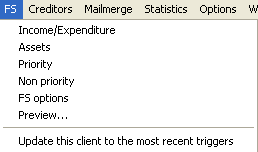
Then RIGHT click on the I/E grids or choose from the bottom item on the 'FS' menu
Either of these will bring up a dialog box to allow you to update this client only to the latest triggers if this is possible
PGFS clients (yellow background) cannot be changed to the CFS

Changing from Version 2010 Version 201104 triggers is simple.
But changing from Version 3 requires you to re-type all income and expenditure items. Cases which were set up with PG8 will be using Version 3 triggers and the way the triggers are calculated and the CFS headings and sections have changed since then. You will be warned if it is going to be necessary to re-type the income and expenditure items individually.


My version of PGdebt 9 does not use the Internet, what should I do ?
Ther are a very small number of users who have an specialised version of PG9 which does not update over the internet. We have contacted all users in this situation directly


I still use PGdebt 8, how can I get the new triggers ?
The ONLY way to update PGdebt to the new triggers is by upgrading to PGdebt 9.
This is because PG8 cannot handle the new system. PG8 has family groups for setting the triggers Version 4 triggers have only four different variations...Single Parent...Couple with Children...Couple...Single person. Version 5 and subsequent triggers are more complex, the triggers are worked out for every case depending on the actual number of Adults, children under 14, children over 14, and vehicles. PG8 simply cannot accept this arrangement. It actually required quite an extensive re-write, hence PG9. PG9 also has the full CFS budget sheet and email direct from the program, which has the potential to save a lot in postage.

Please see the tutorials for PG9 to see the differences. See here for more on the latest CFS


Return to PGdebt Home page